

For many chiropractors, evaluating EHR and practice management software starts with the practitioner experience. Is it modern and up-to-date? Is it intuitive? Can SOAP notes be entered quickly? Does it reduce unnecessary clicks? Does it provide online scheduling, patient messaging, and electronic forms?
Those questions are important. But chiropractors who own their practices also have another role to consider: business owner.
As a healthcare provider, you need software that supports efficient clinical workflows and documentation. As a business owner, you need information, automation, financial control, and operational visibility.
The real question is not simply whether software makes it easier to document a patient visit. It is how effectively the system serves both sides of the practice—and whether it can support the complexity of the practice as it grows.
The Difference Isn't Simply the Number of Features
The distinction isn't simply the number of features listed on a website. What matters more is depth—how thoroughly the system handles the interconnected functions of an entire practice.
Scheduling affects patient flow. Patient flow affects clinical documentation. Clinical documentation supports billing. Billing generates claims and payments. Those financial transactions feed management reporting and help the business owner understand how the practice is performing.
Starter software is often task-oriented. Enterprise-level software is practice-oriented.
Practice Management Is More Than Scheduling
Scheduling is one of the most visible functions of practice management software, but managing a practice involves much more than maintaining a calendar.
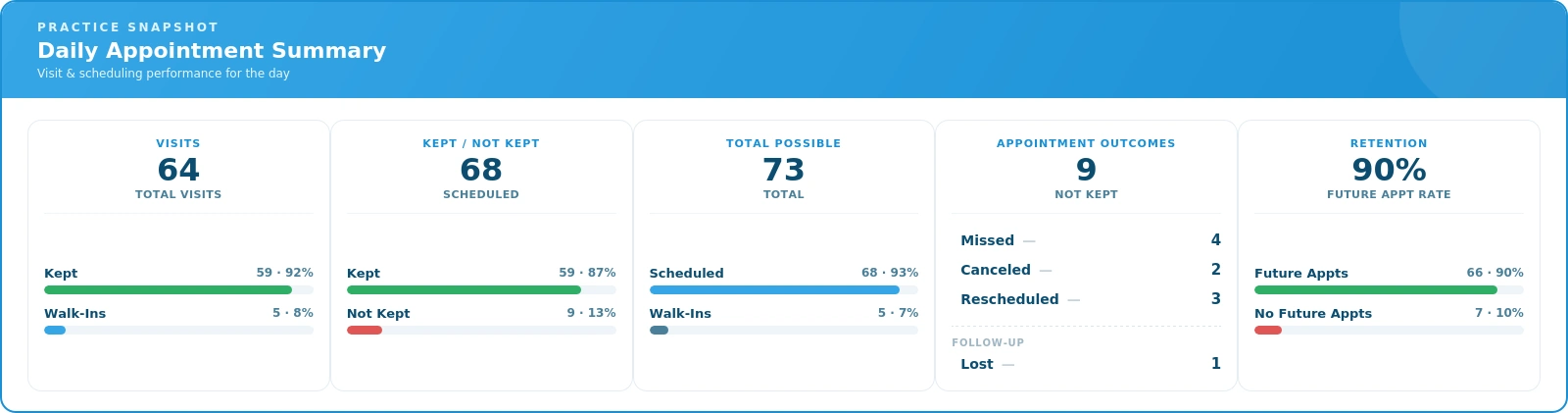
For example, an end-of-day appointment ledger can provide information about kept, missed, rescheduled, canceled, and future appointments, as well as walk-ins, visits, and patients without a future appointment. It can also provide details such as appointment date and time, check-in status, provider, patient, account, procedure code, and duration.
That distinction matters.
A scheduling application tells you what was scheduled. Practice management software helps you understand what actually happened.
The difference becomes even more important as a practice grows, adds providers, or needs greater visibility into daily operations.
Revenue Cycle Management Requires Depth
The financial side of a practice is more complex than simply recording charges and payments.
A comprehensive system may need to support cash patients, prepaid plans, payment plans, statement billing, stored cards, and automatic debits—along with the added complexity insurance brings: eligibility checking, electronic claim filing, ERA retrieval, and automatic payment posting.
Different types of reimbursement also create different requirements. A practice may need to manage commercial insurance, Medicare, Medicaid, workers compensation, and personal injury or attorney cases within the same system.
One particularly important capability is open-item accounting. Rather than applying an insurance payment only at the claim level, open-item accounting applies it to the individual service lines—so the practice can see which services were paid, which weren't, and what still needs follow-up or reconciliation.
This level of detail provides significantly more insight into the financial side of the practice than simply knowing that a claim was paid or that a balance remains.

Management Reporting Should Go Beyond A/R
Accounts receivable is important, but it is only one part of understanding practice performance.
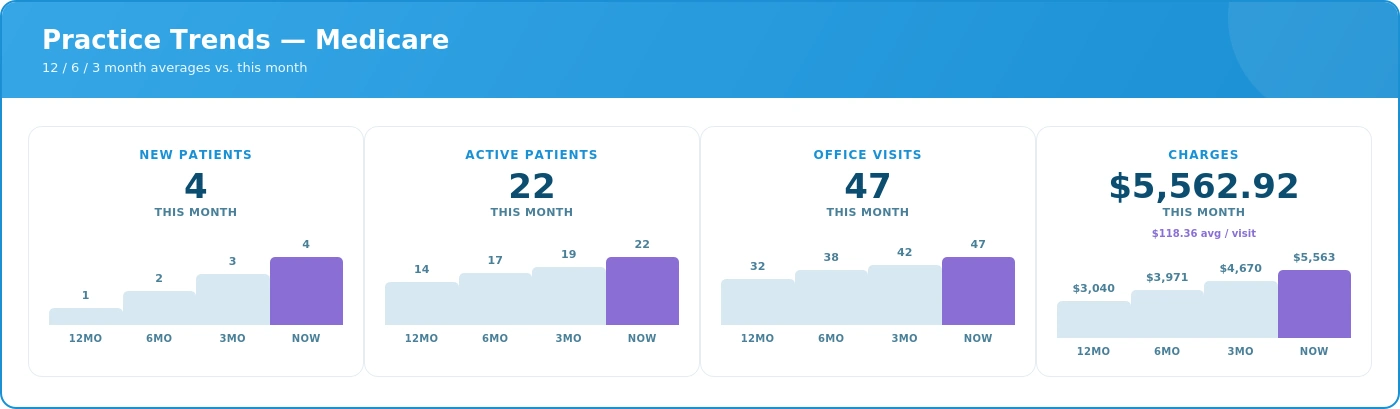
Enterprise-level practice management software can provide trend information across multiple time periods, including new patients, active patients, office visits, charges, receipts, adjustments, visits per active patient, charges per active patient, and charges per visit. Information can also be compared across categories such as cash, insurance, and personal injury.
Management reporting can also go down to the service level, showing charges, payments, visits, and percentage of collections by procedure. At the practice level, reports can provide cumulative, annual, monthly, and daily activity.
Daily analysis can show new patients, visits, charges, adjustments, and receipts, giving the practice an additional way to monitor activity as it occurs.
The value is not simply having more reports. It is being able to move beyond a single A/R or revenue number and understand what is happening inside the practice.
A Good EHR Should Guide the User, Not Just Store Information
An EHR should make documentation efficient, but efficiency isn't the only consideration.
A good EHR can also help guide the user through documentation requirements. This is particularly important when specific requirements apply to Medicare documentation.
For example, a documentation checklist can identify applicable requirements and indicate whether those requirements have been satisfied, while providing access to the appropriate area of the EHR to complete or review the documentation.
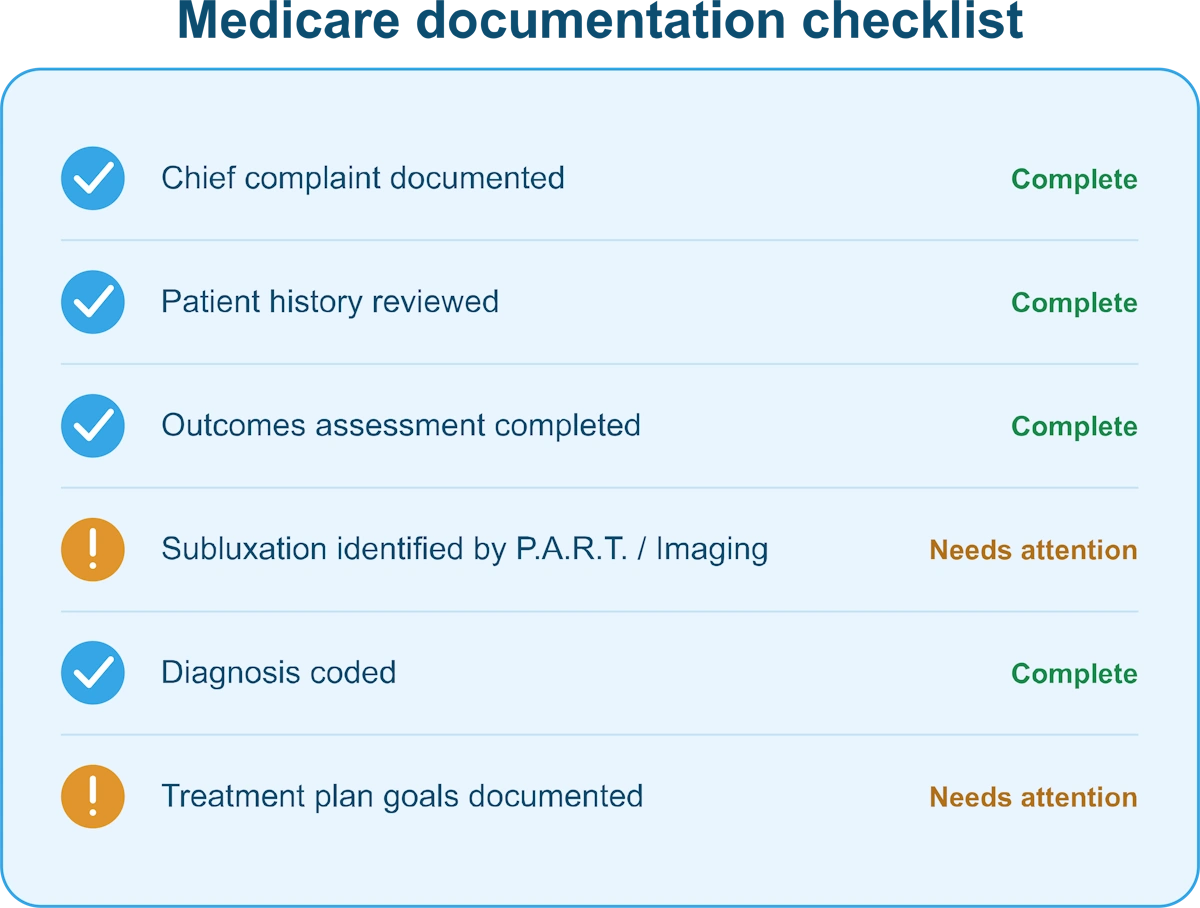
A basic EHR records what the user enters. A sophisticated EHR can guide the user through the documentation process and help identify missing information.
That distinction is important because the value of an EHR isn't limited to storing a completed note. It can also help make the documentation process more consistent and support compliance with applicable requirements.
Controls, Integration, and Scalability
As practices become more complex, control becomes increasingly important.
Enterprise-level systems may provide role-based user permissions and audit logs, allowing practices to control access and maintain greater visibility into system activity.
Integration is equally important. Scheduling, EHR, billing, payments, eligibility, claims, ERA processing, communications, online scheduling, and electronic forms can all be part of the broader practice-management environment.
Scalability also means more than simply adding users.
A system should be capable of handling increasing numbers of providers, employees, patients, transactions, insurance claims, payment arrangements, reports, and data without forcing the practice to manage multiple disconnected systems.
The more pieces of the practice that operate within an integrated system, the more valuable that integration becomes.
Support Is Part of the Software Decision
Software capability only goes so far if the practice cannot get effective help when it needs it.
As a practice becomes more dependent on its software, support becomes part of the overall solution. Prompt assistance matters. Waiting a week for a callback or email response may be very different from having knowledgeable support available when an issue affects daily operations.
Training also matters. Live training, instructional videos, documentation, and knowledgeable support representatives can all contribute to helping a practice get the most from its software.
For an enterprise-level system, customer support should not be treated as an afterthought. It is part of the software decision.
When Does a Practice Need Greater Depth?
Practices don't all have the same level of operational or financial complexity. As a practice grows, the need for greater depth in its software becomes more apparent.
The need for greater depth becomes more apparent when a practice has:
- Multiple providers or locations
- More complex billing or insurance requirements
- Multiple types of reimbursement
- A greater need for management reporting
- Payment plans or other payment arrangements
- Multiple systems that need to work together
- More users with different access requirements
- A need for greater operational and financial visibility
- More demanding documentation requirements
- An administrative workload that is becoming difficult to manage
- A need for stronger training and support resources
At that point, the question changes from “What features does the software have?” to “How much of the practice can this system effectively manage?”
That is the distinction between simply having software and having a practice management system designed to support a complex operation.
What Should You Look For in Enterprise-Level Chiropractic Software?
When evaluating enterprise-level chiropractic practice management and EHR software, consider whether the system provides:
- Integrated practice management and clinical functionality
- Comprehensive financial workflows, including cash patients, prepaid plans, payment plans, statement billing, integrated credit card transactions, stored cards, and automatic debits
- Sophisticated revenue cycle management, including commercial insurance, Medicare, Medicaid, workers compensation, personal injury and attorney cases, electronic claims, eligibility checking, ERA retrieval, automatic payment posting, open-item accounting, and insurance A/R
- Management reporting that provides meaningful information about patients, visits, charges, payments, collections, adjustments, and practice trends
- Guided clinical documentation that helps users meet applicable documentation requirements
- Role-based permissions and audit capabilities
- Integration and scalability across the practice's clinical, administrative, and financial functions
- Professional support and training from people who understand the software and the needs of the practice
These capabilities don't necessarily matter equally to every practice. The right level of functionality depends on the complexity and goals of the individual practice.
Conclusion: Look at the Practice Behind the Software
The difference between practice management and EHR systems isn't necessarily the number of buttons, screens, or features. It is the depth of the system and how effectively those capabilities work together to support the clinical, financial, and operational realities of a practice.
That is why chiropractors who own their practices should evaluate software while wearing both hats: healthcare provider and business owner.
As a practitioner, you need an EHR that is efficient, intuitive, and supports your clinical workflow.
As a business owner, you need a system that gives you control over billing, payments, reporting, operations, documentation, and the financial health of the practice.
The goal isn't to choose between practitioner usability and business-management capability.
The goal is to have both.
An enterprise-level practice management and EHR system helps you do more than run today's schedule—it helps you understand, manage, and improve the practice behind that schedule.
About the Author
Tonio Cutrera is the Marketing Director for EZBIS and has worked in the chiropractic software industry since 1992. He writes about chiropractic software, patient engagement, EHR, billing, scheduling, workflow automation, and practice growth.
Learn more about Tonio Cutrera: https://ezbis.com/about/tonio-cutrera/