Enterprise Chiropractic Practice Management & EHR Software

Tonio Cutrera

EHR Integrated Workflow

For many chiropractors, evaluating EHR and practice management software starts with the practitioner experience. Is it modern and up-to-date? Is it intuitive? Can SOAP notes be entered quickly? Does it reduce unnecessary clicks? Does it provide online scheduling, patient messaging, and electronic forms?

Those questions are important. But chiropractors who own their practices also have another role to consider: business owner.

As a healthcare provider, you need software that supports efficient clinical workflows and documentation. As a business owner, you need information, automation, financial control, and operational visibility.

The real question is not simply whether software makes it easier to document a patient visit. It is how effectively the system serves both sides of the practice—and whether it can support the complexity of the practice as it grows.

The Difference Isn't Simply the Number of Features

The distinction isn't simply the number of features listed on a website. What matters more is depth—how thoroughly the system handles the interconnected functions of an entire practice.

Scheduling affects patient flow. Patient flow affects clinical documentation. Clinical documentation supports billing. Billing generates claims and payments. Those financial transactions feed management reporting and help the business owner understand how the practice is performing.

Starter software is often task-oriented. Enterprise-level software is practice-oriented.

Practice Management Is More Than Scheduling

Scheduling is one of the most visible functions of practice management software, but managing a practice involves much more than maintaining a calendar.

For example, an end-of-day appointment ledger can provide information about kept, missed, rescheduled, canceled, and future appointments, as well as walk-ins, visits, and patients without a future appointment. It can also provide details such as appointment date and time, check-in status, provider, patient, account, procedure code, and duration.

That distinction matters.

A scheduling application tells you what was scheduled. Practice management software helps you understand what actually happened.

The difference becomes even more important as a practice grows, adds providers, or needs greater visibility into daily operations.
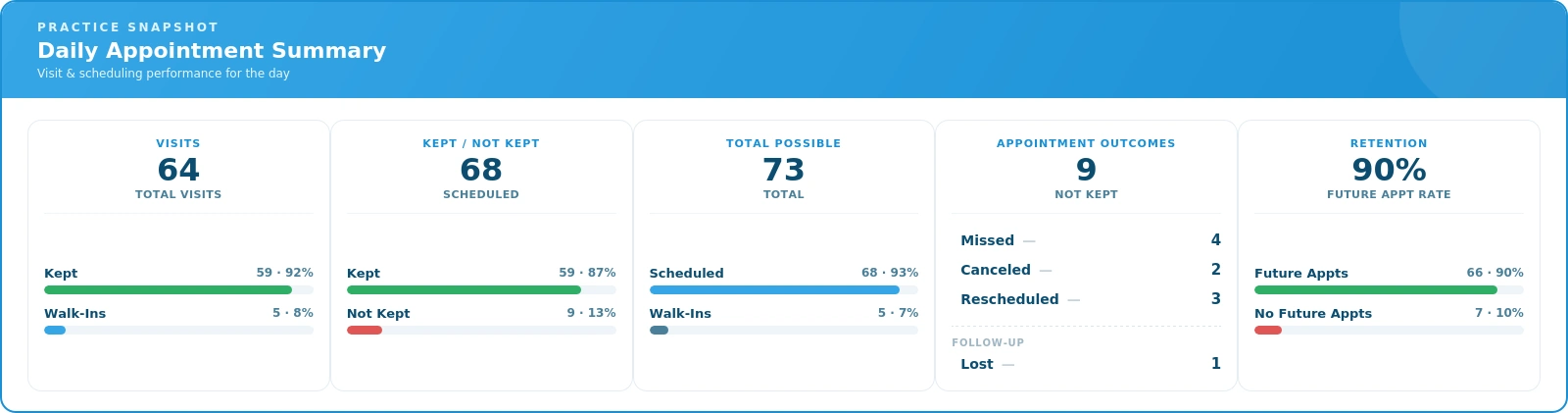
Daily appointment summary showing visits, kept appointments, missed appointments, and future appointments
Practice management extends beyond scheduling by providing visibility into what actually happened throughout the day.

Revenue Cycle Management Requires Depth

The financial side of a practice is more complex than simply recording charges and payments.

A comprehensive system may need to support cash patients, prepaid plans, payment plans, statement billing, stored cards, and automatic debits—along with the added complexity insurance brings: eligibility checking, electronic claim filing, ERA retrieval, and automatic payment posting.

Different types of reimbursement also create different requirements. A practice may need to manage commercial insurance, Medicare, Medicaid, workers compensation, and personal injury or attorney cases within the same system.

One particularly important capability is open-item accounting. Rather than applying an insurance payment only at the claim level, open-item accounting applies it to the individual service lines—so the practice can see which services were paid, which weren't, and what still needs follow-up or reconciliation.

This level of detail provides significantly more insight into the financial side of the practice than simply knowing that a claim was paid or that a balance remains.

Revenue Cycle

Management Reporting Should Go Beyond A/R

Accounts receivable is important, but it is only one part of understanding practice performance.

Enterprise-level practice management software can provide trend information across multiple time periods, including new patients, active patients, office visits, charges, receipts, adjustments, visits per active patient, charges per active patient, and charges per visit. Information can also be compared across categories such as cash, insurance, and personal injury.

Management reporting can also go down to the service level, showing charges, payments, visits, and percentage of collections by procedure. At the practice level, reports can provide cumulative, annual, monthly, and daily activity.
Daily analysis can show new patients, visits, charges, adjustments, and receipts, giving the practice an additional way to monitor activity as it occurs.

The value is not simply having more reports. It is being able to move beyond a single A/R or revenue number and understand what is happening inside the practice.
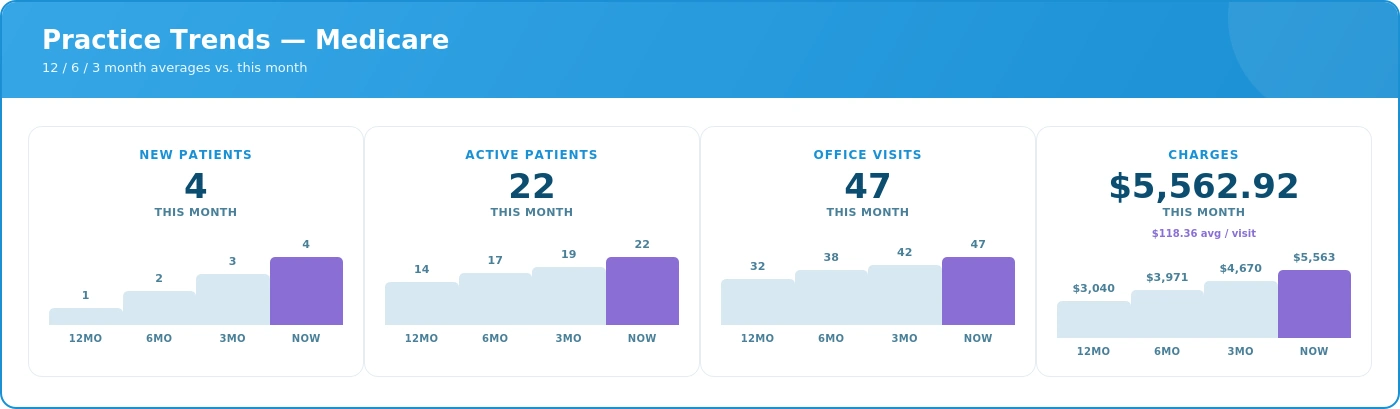
Practice Trends
Meaningful practice reporting goes beyond A/R to provide visibility into patients, visits, charges, receipts, collections, and practice trends.

A Good EHR Should Guide the User, Not Just Store Information

An EHR should make documentation efficient, but efficiency isn't the only consideration.

A good EHR can also help guide the user through documentation requirements. This is particularly important when specific requirements apply to Medicare documentation.

For example, a documentation checklist can identify applicable requirements and indicate whether those requirements have been satisfied, while providing access to the appropriate area of the EHR to complete or review the documentation.
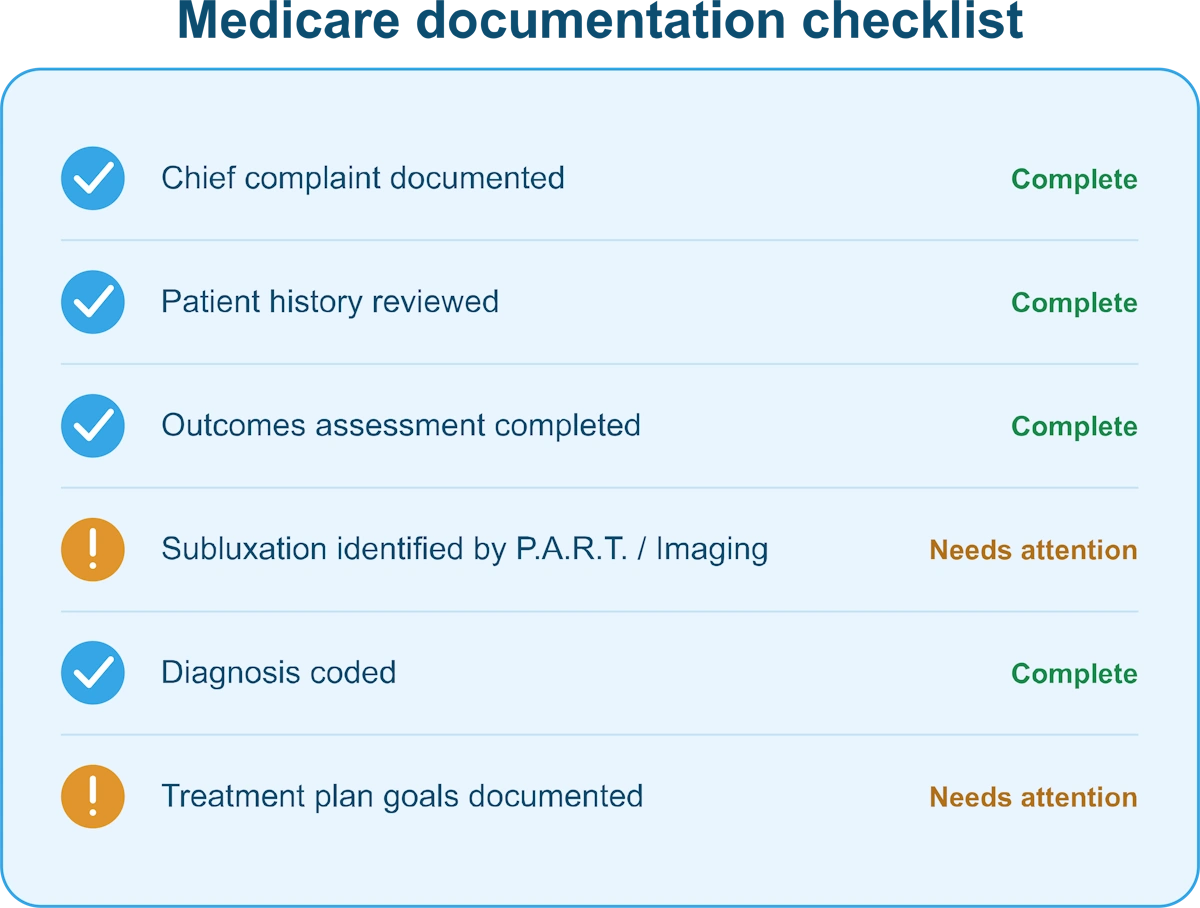
Medicare documentation checklist in chiropractic EHR software

A basic EHR records what the user enters. A sophisticated EHR can guide the user through the documentation process and help identify missing information.

That distinction is important because the value of an EHR isn't limited to storing a completed note. It can also help make the documentation process more consistent and support compliance with applicable requirements.

Controls, Integration, and Scalability

As practices become more complex, control becomes increasingly important.

Enterprise-level systems may provide role-based user permissions and audit logs, allowing practices to control access and maintain greater visibility into system activity.

Integration is equally important. Scheduling, EHR, billing, payments, eligibility, claims, ERA processing, communications, online scheduling, and electronic forms can all be part of the broader practice-management environment.

Scalability also means more than simply adding users.

A system should be capable of handling increasing numbers of providers, employees, patients, transactions, insurance claims, payment arrangements, reports, and data without forcing the practice to manage multiple disconnected systems.

The more pieces of the practice that operate within an integrated system, the more valuable that integration becomes.

Support Is Part of the Software Decision

Software capability only goes so far if the practice cannot get effective help when it needs it.

As a practice becomes more dependent on its software, support becomes part of the overall solution. Prompt assistance matters. Waiting a week for a callback or email response may be very different from having knowledgeable support available when an issue affects daily operations.

Training also matters. Live training, instructional videos, documentation, and knowledgeable support representatives can all contribute to helping a practice get the most from its software.

For an enterprise-level system, customer support should not be treated as an afterthought. It is part of the software decision.

When Does a Practice Need Greater Depth?

Practices don't all have the same level of operational or financial complexity. As a practice grows, the need for greater depth in its software becomes more apparent.

The need for greater depth becomes more apparent when a practice has:

  • Multiple providers or locations
  • More complex billing or insurance requirements
  • Multiple types of reimbursement
  • A greater need for management reporting
  • Payment plans or other payment arrangements
  • Multiple systems that need to work together
  • More users with different access requirements
  • A need for greater operational and financial visibility
  • More demanding documentation requirements
  • An administrative workload that is becoming difficult to manage
  • A need for stronger training and support resources

At that point, the question changes from “What features does the software have?” to “How much of the practice can this system effectively manage?”

That is the distinction between simply having software and having a practice management system designed to support a complex operation.

What Should You Look For in Enterprise-Level Chiropractic Software?

When evaluating enterprise-level chiropractic practice management and EHR software, consider whether the system provides:

  • Integrated practice management and clinical functionality
  • Comprehensive financial workflows, including cash patients, prepaid plans, payment plans, statement billing, integrated credit card transactions, stored cards, and automatic debits
  • Sophisticated revenue cycle management, including commercial insurance, Medicare, Medicaid, workers compensation, personal injury and attorney cases, electronic claims, eligibility checking, ERA retrieval, automatic payment posting, open-item accounting, and insurance A/R
  • Management reporting that provides meaningful information about patients, visits, charges, payments, collections, adjustments, and practice trends
  • Guided clinical documentation that helps users meet applicable documentation requirements
  • Role-based permissions and audit capabilities
  • Integration and scalability across the practice's clinical, administrative, and financial functions
  • Professional support and training from people who understand the software and the needs of the practice

These capabilities don't necessarily matter equally to every practice. The right level of functionality depends on the complexity and goals of the individual practice.

Conclusion: Look at the Practice Behind the Software

The difference between practice management and EHR systems isn't necessarily the number of buttons, screens, or features. It is the depth of the system and how effectively those capabilities work together to support the clinical, financial, and operational realities of a practice.

That is why chiropractors who own their practices should evaluate software while wearing both hats: healthcare provider and business owner.

As a practitioner, you need an EHR that is efficient, intuitive, and supports your clinical workflow.

As a business owner, you need a system that gives you control over billing, payments, reporting, operations, documentation, and the financial health of the practice.

The goal isn't to choose between practitioner usability and business-management capability.

The goal is to have both.

An enterprise-level practice management and EHR system helps you do more than run today's schedule—it helps you understand, manage, and improve the practice behind that schedule.

About the Author

Tonio Cutrera is the Marketing Director for EZBIS and has worked in the chiropractic software industry since 1992. He writes about chiropractic software, patient engagement, EHR, billing, scheduling, workflow automation, and practice growth.

Learn more about Tonio Cutrera: https://ezbis.com/about/tonio-cutrera/

Chiropractic Patient Engagement: How to Improve Retention, Reviews, and Recall

Tonio Cutrera

chiropractic patient engagement
Patient engagement is more than appointment reminders. For chiropractic practices, it is a system for improving retention, generating reviews, reactivating inactive patients, and supporting long-term practice growth.

The framework for chiropractic patient engagement

A chiropractor notices that 40% of new patients stop returning after their third visit.

The practice has no systematic follow-up process. Reminder texts are inconsistent. Review requests are not structured. There is also no reliable way to reconnect with patients who stop scheduling follow-up care.

Within six months, the impact becomes clear: lower retention, fewer reviews, weaker online visibility, fewer referrals, and declining recurring revenue.

Patient engagement helps prevent this leakage. It creates consistent touchpoints that keep patients connected to their care plan, more likely to return, and more willing to share positive experiences online.

Where Chiropractic Practices Lose Patients

Chiropractic Patient Retention Funnel

Retention and growth depend on four dimensions working together:

  1. Post-visit follow-up (the immediate window after care)
  2. Ongoing communication cadence (staying top-of-mind between appointments)
  3. Online reputation building through visit reviews (turning satisfied patients into visible advocates)
  4. Recall and reactivation of lapsed patients (bringing back those who stopped care)

Each dimension supports the others. A patient who feels supported is more likely to stay in care, leave a positive review, and return when reminded.

Dimension 1: Post-visit follow-up and treatment accountability

The first 24-72 hours after an initial visit often determine whether a patient returns for appointment two. Automated follow-up texts reinforce care recommendations, validate the patient’s decision to seek care, and create a sense of clinical accountability.

A simple follow-up message can:

  • Ask how symptoms are progressing
  • Reinforce the recommended care plan
  • Confirm the next scheduled appointment
  • Offer an easy reply path for questions

This is not marketing—it is care coordination. Patients are significantly more likely to continue treatment when they feel their provider is monitoring progress between visits.

For busy chiropractic offices, automation is essential. This is where integrated chiropractic software becomes valuable: engagement workflows can be tied directly to scheduling, visit history, patient status, and recall activity instead of being managed manually across disconnected tools. Staff cannot manually follow up with every new patient at scale, but integrated software can deliver personalized outreach consistently.

Dimension 2: Ongoing communication between visits

Patients often discontinue care not because they are dissatisfied, but because life interrupts routines. Regular communication helps keep treatment goals visible.

Effective engagement examples include:

  • Appointment reminders
  • Home exercise tips
  • Posture guidance
  • Progress check-ins
  • Wellness education
  • Scheduling prompts for maintenance care

The goal is relevance, not volume. Messages should align with the patient’s care phase:

Acute care: symptom tracking and appointment adherence
Corrective care: milestone reinforcement and education
Maintenance care: wellness reminders and preventive scheduling

Consistent, useful communication reduces forgotten appointments and keeps patients engaged longer.

Dimension 3: Soliciting visit reviews to improve trust and AI search visibility

Online reviews are one of the most overlooked forms of patient engagement. Every positive review strengthens:

  • Local SEO rankings
  • Google Business Profile visibility
  • AI search visibility
  • Consumer trust
  • Referral conversion rates

Patients trust other patients. A chiropractic office with a strong stream of recent, authentic reviews appears more credible to both search engines and prospective patients.

The best time to request a review is shortly after a positive visit outcome—when the patient feels improvement and satisfaction is highest.

As AI-powered search tools increasingly summarize local businesses based on public signals like reviews, reputation, relevance, and inline authority, a steady flow of recent patient feedback can help practices appear more credible and discoverable.

How Reviews Fuel Practice Growth

Review Growth Loop

Best practices for review solicitation:

  • Send a text within 1-3 hours after a successful visit
  • Include a direct review link
  • Keep messaging simple and appreciative
  • Ask consistently, not selectively
  • Automate the process

Example:
“Thanks for visiting us today! If you’re feeling great about your experience, would you mind sharing a quick review? Your feedback helps others find quality chiropractic care.”

This strategy does more than boost reputation—it creates fresh, patient-generated content that strengthens discoverability in traditional search and emerging AI-driven search systems.

Dimension 4: Recall texts for patients who stopped coming in

Many practices focus heavily on new patient acquisition while ignoring inactive patients—often their easiest revenue opportunity.

Patients who stop coming in for follow-up visits are not always “lost.” Many simply got busy, forgot, or deprioritized care.

A structured recall system can identify:

  • Missed appointments
  • No future appointments scheduled
  • 30-, 60-, or 90-day inactivity
  • Care plans left incomplete

How Recall Automation Brings Patients Back

Patient Recall Workflow

Effective recall text examples:

30 days inactive:
“Hi [Name], we haven’t seen you in a while. How are you feeling? Reply here if you’d like to schedule your next visit.”

60+ days inactive:
“Your spinal health matters. If discomfort has returned or you’d like to stay on track, we’d be happy to help you schedule.”

These messages work because they frame reactivation as health support, not sales pressure.

Practices that proactively reconnect with lapsed patients can recover significant otherwise-lost revenue while also improving long-term health outcomes.

The compound effect: retention + reviews + recall

When these systems work together, the benefits multiply:

  • Improved retention: Patients stay consistent with care plans.
  • Stronger reputation: Satisfied patients leave reviews that improve online authority.
  • Better reactivation: Inactive patients return through structured recall campaigns.
  • Higher referrals: Engaged patients are more likely to recommend your office.
  • Greater AI and local search visibility: Frequent reviews, engagement signals, and active patient communication all strengthen digital prominence.

Common mistakes to avoid

  1. Only focusing on appointment reminders: Reminders alone are transactional. Engagement should also educate, encourage, and reactivate.
  1. Never asking for reviews: Happy patients often need prompting. Without a system, practices miss valuable social proof.
  1. Ignoring inactive patients: Lapsed patients are often easier to recover than acquiring brand-new ones.
  1. Sending generic mass texts: Personalized, phase-specific communication outperforms broad promotional messaging.
  1. Treating engagement like marketing instead of patient care: The most effective communication feels supportive, clinical, and relevant.

What practice owners should measure

To improve retention and visibility, monitor:

  • Second-appointment show rate
  • Average patient visit duration
  • Review request conversion rate
  • Google review volume and recency
  • Recall reactivation rate
  • Patient referral percentage
  • No-show rate

These metrics reveal where patient leakage occurs and where automation can create measurable growth.

Final takeaway

Patient engagement is no longer optional for chiropractic practices that want to compete effectively. It is a business growth system that supports retention, reputation, and reactivation simultaneously.

Sustainable growth starts with engagement

Practice Growth Pyramid

The practices that grow most effectively are not successful because of clinical skill alone—they also have strong systems for:

  • Following up after visits
  • Keeping patients engaged
  • Generating reviews
  • Recalling inactive patients

For EZBIS users, integrating these workflows into daily operations can help practices not only retain more patients, but also strengthen search visibility, improve reputation, and drive sustainable long-term revenue growth.

About the Author

Tonio Cutrera is the Marketing Director for EZBIS and has worked in the chiropractic software industry since 1992. He writes about chiropractic software, patient engagement, EHR, billing, scheduling, workflow automation, and practice growth.

Learn more about Tonio Cutrera: https://ezbis.com/about/tonio-cutrera/

New EZBIS Version 14

Tonio Cutrera

EZBIS 14
Check out the fantastic new features in EZBIS 14!

Electronic Document Signing *
In the new Waiting Room app or online through the MyPatientSite.com patient portal, patients can sign forms electronically. New patients can sign documents such as HIPAA agreements, informed consent and financial policies as part of the online intake. You can use your own forms or use built-in templates. For established patients, email or text notifications can be sent to request signatures on documents. Signed documents are kept on file in the EZBIS software.

EZBIS Electronic Document Signing


Appointment Types for Online Scheduling *
Now, when patients are scheduling their own appointments online, they can choose a specific type of appointment, like an adjustment, a flare-up or a new problem. You define which types of appointments are possible for each provider. Extra time is automatically scheduled for some appointment types, based on your preferences. Patients are only shown time slots that available. Appointments are synced to your Front Desk schedule in real time.

EZBIS Online Scheduling with Appointment Types

* The MyPatientSite patient portal and the Waiting Room app require either an annual or monthly service agreement or a cloud hosting subscription.

Automated Patient Engagement Messaging **

EZBIS 14 offers a new automated messaging for sending messages to patients via text message ** or email. There are several different types of automated messages in the new version 14. The messages are pre-written for you, but can be modified to fit your needs.

New Patient Intake
The new patient intake message is sent automatically when a new patient appointment is scheduled. The text or email encourages the new patient to complete the online intake before the first visit.

EZBIS Automated Messages

New Patient Intake Reminder

This reminder message is sent to new patients who have not yet done the online intake and the first visit is approaching. It reminds patients that they can save time on the visit if they complete the intake prior to the appointment.

New Patient Follow Ups

There are up to five follow up messages that can be sent to patients after the initial visit. These are designed to encourage patients to continue their care, prevent no-shows and improve patient retention. For example, a new patient may receive an automated message on the day following their first visit, to thank them for choosing your practice. The new patient could receive a second message after three visits to stress the importance of following the care plan. After twelve visits, they could receive a message to encourage the patient to stay on the right track and to ask for referrals.

Birthday Wishes

Patients receive a “happy birthday” text or email on or before their birthday.

Patient Recalls

When patients drop out of care, they receive a recall message. For example, if a patient’s last visit was 6 months
ago, a message is sent that says “We haven’’t seen you in a while! Your health is important to us, so please call to
schedule an appointment today!

Visit Reviews

The visit reviews are text-only messages that are automatically sent to patients after a visit to ask them to rate their experience on a scale of 1-5. The replies come back to you in the EZBIS software.

Then, (optionally) if a patient rated the visit with a 4 or a 5, a second text message is sent asking the patient to please leave a review on Google. (for example) Also, you can configure a message to be sent if a patient rated the visit poorly, to ask how you can make their experience better.


** Email messages and the online intake require either an annual or monthly service agreement or a cloud hosting subscription. Text messages require the EZBIS appointment reminder and messaging system. Per message fees apply.

Image

Exclusive Appointments

A great new addition to the Front Desk module is the ability to make appointments exclusive. Often, for certain types of appointments, such as new patient appointments and re-exams, a doctor does not want treat other patients during the same time. Now, you can make those types of appointments exclusive so the entire block of time is reserved.

This new enhancement is especially handy for patient-online-scheduling. Now when patients choose an appointment type when scheduling online, extra time is allocated and no other patients can book appointments for the same time slot.

Exclusive Appointments

General Notepad

Previous versions of EZBIS were limited to just a couple of remarks lines for staff to use for notes such as insurance policy coverage and limitations. EZBIS 14 adds a notepad to make more extensive comments. The notepad can be printed and is also searchable with the Survey Generator.

General Notepad

Patient Lookup by Birthday

New to version 14 is the ability to find patients by birthday. When opening a patient account, you can simply type in the patient birth date and EZBIS will find all patients that match.

Also, the birth date has been added to the patient lookup list so that when searching for patients, you can distinguish between

Patient Lookup by Birthday

Next Appointment on the Status Bar

Now, throughout the EZBIS software, you can easily see a patient’s next appointment date and time.

Next Appointment on the Status Bar

New EHR Items

We have added many new treatment categories and items in the Electronic Health Records. Now, there are many physical therapy, dry needling, cupping and joint mobilization items.

EHR Items

New Outcomes Assessment Questionnaires

The EHR now offers additional OA tools, including the Keele STarT Back Screening Tool, PCL5 PTSD questionnaire, PROMIS 6B, the UHC back and neck indexes, the Patient Health PHQ-9 and the Oswestry Hip Questionnaire.


Activity Ledger Details

The activity ledger in the Filing module now features additional columns for the procedure code, modifiers and units.

Activity Procedure Codes and Modifiers

Scheduled Emails **

You can now schedule bulk email campaigns to patients for the future. For example, you can set up emails to be sent for holidays in advance of the actual sending date and time.

Claim Progress for Availity Advanced

For those using the Availity Advanced clearinghouse with EZBIS, we now display a claim status in the claims ledger, including “AR - accepted by the receiver ” and “RR - rejected by the receiver”, “AP - accepted by the payer” and “RP - rejected by the payer.” There are claim progress notes, including rejection reasons. (Available for Availity Advanced only)

Claim Progress for Availity

** Email messages require either an annual or monthly service agreement or a cloud hosting subscription. Text messages require the EZBIS appointment reminder and messaging system. Per message fees apply.


Want to Know More?
Get Version 14 Now!
Call (800) 445-7816

New EZBIS Schedule App

Tonio Cutrera

Now, take your EZBIS appointment schedule with you anywhere!


The EZBIS Schedule app for iOS and Android phones and tablets gives you the ability to see and change your appointment schedule from anywhere! You can add new appointments, (including new patient appointments, reschedule appointments, add or change time blocks and much more. Changes that are made in the app synchronize back to your EZBIS Front Desk rapidly, so your schedule is always up-to-date. The EZBIS Schedule app is available for subscribers to an annual EZBIS Service agreement or to EZBIS Cloud users.
Daily View

Latest update for Change Healthcare/Emdeon

Tonio Cutrera


Update on Change Healthcare (Emdeon) Outage

April 2, 2024

EZBIS is intently monitoring the restoration efforts for the Change Healthcare outage. We were hopeful that the claims clearinghouse would be online by this time. Although some platforms that were affected by the cyber-attack have been restored, the Emdeon-Change Healthcare clearinghouse remains unavailable and we have not been provided with an ETA for restoration of services.

We recommend Availity Advanced as an alternate clearinghouse for those EZBIS users who are in need to submit claims in the short term. We are also diligently working to establish other workarounds for submitting claims in the interim until the Change Healthcare clearinghouse is operational.

The Availity Advanced clearinghouse works much like the Emdeon-Change Healthcare clearinghouse for claims and ERAs and has a similar payer list. There are some notable exceptions, such as Medicare of Indiana and Medicare of Georgia. EZBIS has developed some tools to make the transition to Availity Advanced as easy as possible for sending claims. The reception of ERAs does take more time. If you choose to transition to the Availity Advanced clearinghouse either as a temporary workaround or as a permanent EDI solution, use the following link to download the enrollment forms. Please fax the enrollments to EZBIS at
(337) 237-1251. Do not send the forms to Availity.

Availity Advanced Enrollment Kit

If you have questions about the Availity Advanced clearinghouse connection, you can contact us at (800) 445-7816, option 4.

UnitedHealth Group has published that explains the cyber response in greater detail: https://www.unitedhealthgroup.com/changehealthcarecyberresponse

Both Change Healthcare and EZBIS will continue to provide updates regarding the status of the issue. You can also monitor the status using the following link: https://status.changehealthcare.com/incidents/hqpjz25fn3n7


EZBIS
(800) 445-7816
Like Us on FacebookFollow Us on Twitter


Change Healthcare Cyber Attack Status – updated

Tonio Cutrera

Update on Change Healthcare (Emdeon) Outage 3/20/2024
We continue to closely monitor the recovery efforts for the Change Healthcare clearinghouse. The latest information that we have is that testing is ongoing for the claims submission platform that EZBIS and numerous other organizations utilize. The briefing that we received last week projected a timeline for testing and reestablishment of connectivity throughout the current week. However, this is an estimate and we do not have further information regarding the ETA for restoration.

We continue to recommend Availity Advanced as an alternate clearinghouse for those EZBIS users who are in need to submit claims in the short term. We are also diligently working to establish other workarounds for submitting claims in the interim until the Change Healthcare clearinghouse is operational. One of these workarounds is the Optum iEDI clearinghouse, which we understand may not require re-enrollment. We are currently working to establish connectivity with Optum iEDI.

We have a sincere understanding that this situation affects your cash flow. Please be assured that EZBIS is working both with Change Healthcare for status updates and with other partners for alternative methods for claim submission. Please refer to the following web page that Change Healthcare and parent company UnitedHealth Group has published that explains the cyber response in greater detail: https://www.unitedhealthgroup.com/changehealthcarecyberresponse

If you would like more information about our Availity Advanced clearinghouse connection, you can contact us at (800) 445-7816, option 4. Both Change Healthcare and EZBIS will continue to provide updates regarding the status of the issue. You can also monitor the status using the following link: https://status.changehealthcare.com/incidents/hqpjz25fn3n7

Protect Yourself with Cyber Security Services

Tonio Cutrera

BlueSky-Cybersecurity

BlueSky Technologies, an EZBIS partner has this to say about protecting against cyber threats.

Cyber threats have become more advanced, it’s crucial to improve protection. At BlueSky, we take a comprehensive approach to keep your staff and systems safe from bad actors.

BlueSky Recommended CyberSecurity Guidelines

1- Regular Backups and Data Integrity Testing: Schedule backups and tests for data integrity.

2- Virus Protection: Keep device virus protection up to date. Monitored regular updates and scans for malware or viruses.

3- Systems and Applications Updates: Stay proactive with updates and patches to address vulnerabilities.

4- Physical Safety and Security: Enforce policies for device security and system encryption.

5- Email and Mobile Encryption: Implement encryption for sensitive data in emails and on mobile devices.

6- Staff Training: Train staff on security protocols, risks of workarounds, and consequences of disabling security protections.

7- Password Policies: Implement strong password policies with complex passwords and regular changes.

Download this white paper for more details

New Version 13 Now Available

Tonio Cutrera

EZBIS Version 13!

What can you say but WOW!

EZBIS 13 is flying out the door. You won't believe how much we have packed into this latest version of the best software available for chiropractors today.

Buit-in two-way texting

You can now have two-way tex conversations with patients. New messages have a notification so that you can instantly reply. *

Additional, same day appointment reminder.

For those patients that need an extra little nudge. *

Medicare Checklist

In the EHR, a new Medicare checklist makes sure that you have fully documented everything that is needed for medicare compliance. Use it for all your patients!

New Patient Express

Also for EHR, everything you need for documenting the first visit for a new patient is all on one screen! Talk about a time-saver!

Easy voice dictation

If you like to make notes using your voice, you click a button and start talking. Your speech is instantly transcribed before your eyes!

Email Receipts

Receipts (regular or credit card) can be emailed or uploaded to the MyPatientSite patient portal rather than printed. *

Patient calendar printout

A six-month appointment calendar can be printed, emailed or uploaded tot he MyPatientSite patient portal *
 *  Some features have an additional cost or require an annual EZBIS service agreement.